


Note
Go to the end to download the full example code.
ResNet50 deployment with TensorRT Patterns#
This quickstart shows how to prepare a PyTorch ResNet50 model for deployment
with embedl_deploy.
The core idea is simple:
A
transformapplies a list of graph rewrite patterns.A
planlets you inspect and edit every match before applying it.quantizeturns the fused model into an INT8-ready graph (PTQ or QAT).
In the current public release, the packaged backend is TensorRT. The core API is backend-agnostic, and additional backends may be added over time.
For TensorRT, the pattern library is split into two buckets:
Conversions: structural rewrites run first to normalize graphs.
Fusions: combine layer sequences into fused modules.
Note
This tutorial uses random weights for illustration. In practice you would start from a pre-trained checkpoint.
Setup#
We start by loading a standard torchvision model in eval mode.
import torch
from torchvision.models import resnet50

model = resnet50(weights=None).eval()
example_input = torch.randn(1, 3, 224, 224)

print(f"Model: {type(model).__name__}")
print(f"Parameters: {sum(p.numel() for p in model.parameters()):,}")
One-shot transformation with transform()#
The simplest way to prepare a model is to call
transform() with a pattern list:
from embedl_deploy import transform
from embedl_deploy.tensorrt import (
    TENSORRT_CONVERSION_PATTERNS,
    TENSORRT_FUSION_PATTERNS,
    TENSORRT_PATTERNS,
)

print("\nTensorRT pattern groups:")
print(f"  conversions: {len(TENSORRT_CONVERSION_PATTERNS)}")
print(f"  fusions:     {len(TENSORRT_FUSION_PATTERNS)}")
print(f"  total:       {len(TENSORRT_PATTERNS)}")

deployed = transform(model, (example_input,), patterns=TENSORRT_PATTERNS).model
Inspect the fused modules#
The transformed model contains fused nn.Module subclasses instead
of the original separate Conv, BatchNorm, and ReLU layers.
from collections import Counter

from embedl_deploy.tensorrt.modules import (
    FusedAdaptiveAvgPool2d,
    FusedConvBN,
    FusedConvBNAct,
    FusedConvBNActMaxPool,
    FusedConvBNAddAct,
)

FUSED_MODULE_TYPES = (
    FusedConvBN,
    FusedConvBNAddAct,
    FusedConvBNAct,
    FusedConvBNActMaxPool,
    FusedAdaptiveAvgPool2d,
)

fused_counts = Counter(
    type(m).__name__
    for m in deployed.modules()
    if isinstance(m, FUSED_MODULE_TYPES)
)

print("Fused modules in the transformed model:\n")
for name, count in sorted(fused_counts.items()):
    print(f"  {name:<25s} {count}")
print(f"  {'TOTAL':<25s} {sum(fused_counts.values())}")

# In ResNet50, common fusions include:
# - Stem block: ``Conv`` + ``BatchNorm`` + ``ReLU`` + ``MaxPool``
# - Main path: ``Conv`` + ``BatchNorm`` or ``Conv`` + ``BatchNorm`` + ``ReLU``
# - Residual blocks: ``Conv`` + ``BatchNorm`` + ``Add`` + ``ReLU``
# - Tail rewrite: ``AdaptiveAvgPool`` handling before classifier export
Verify numerical equivalence#
The fused model must produce bit-for-bit identical outputs (no weight folding has happened yet — that is left to the TensorRT compiler).
with torch.no_grad():
    y_original = model(example_input)
    y_deployed = deployed(example_input)

max_diff = (y_original - y_deployed).abs().max().item()
print(f"Max output difference: {max_diff:.2e}")
assert max_diff < 1e-5, f"Numerical mismatch: {max_diff}"
print("✓ Fused model is numerically equivalent to the original.")
Plan-based workflow#
For full control, use the two-step workflow:
get_transformation_plan() to discover matches,
then apply_transformation_plan() to apply them.
The plan is editable — you can toggle match.apply = False
to skip specific matches before applying.
from embedl_deploy import (
    apply_transformation_plan,
    get_transformation_plan,
    prepare_graph,
)

graph_module = prepare_graph(model, (example_input,))
plan = get_transformation_plan(graph_module, patterns=TENSORRT_PATTERNS)

print(f"\nDiscovered {sum(len(v) for v in plan.matches.values())} matches:\n")
for node_name, patterns in plan.matches.items():
    for pat_name, match in patterns.items():
        print(f"  {node_name}: {pat_name} (apply={match.apply})")
Apply the plan without changes:
result = apply_transformation_plan(plan)

print(f"Applied: {result.report['applied_count']}")
print(f"Skipped: {result.report['skipped_count']}")
Note
A non-zero skipped_count is expected and intentional.
All patterns are matched against the graph independently first.
The plan then iterates through the results in pattern-list order,
building a set of consumed nodes. When a match’s nodes overlap with
nodes already claimed by an earlier match, it is marked
apply=False and counted as skipped.
For ResNet50 with TENSORRT_PATTERNS this means:
StemConvBNActMaxPoolPattern (listed first) claims the
Conv→BN→ReLU→MaxPool stem nodes. The shorter
ConvBNActPattern, ConvBNPattern, etc. also match sub-chains
within that same stem, so they are skipped because their nodes were
already consumed.
This is how pattern priority works: supply the longest / most specific patterns first so they take precedence over shorter, more general ones when sub-graphs overlap.
Edit the plan before applying#
Disable a specific match by setting apply = False:
plan2 = get_transformation_plan(graph_module, patterns=TENSORRT_PATTERNS)

# Disable fusion of the stem
plan2.matches["maxpool"]["StemConvBNActMaxPoolPattern"].apply = False

result2 = apply_transformation_plan(plan2)

fused2_counts = Counter(
    type(m).__name__
    for m in result2.model.modules()
    if isinstance(m, FUSED_MODULE_TYPES)
)
print(
    f"Fused modules (stem skipped): {sum(fused2_counts.values())} "
    f"(was {sum(fused_counts.values())})"
)
print(f"Skipped: {result2.report['skipped_count']}")
Toggle only conversion or fusion patterns#
You can scope the transformation by choosing pattern groups directly.
only_fusions = transform(
    model, (example_input,), patterns=TENSORRT_FUSION_PATTERNS
).model
only_conversions = transform(
    model, (example_input,), patterns=TENSORRT_CONVERSION_PATTERNS
).model

only_fusions_count = sum(
    1 for m in only_fusions.modules() if isinstance(m, FUSED_MODULE_TYPES)
)
only_conversions_count = sum(
    1 for m in only_conversions.modules() if isinstance(m, FUSED_MODULE_TYPES)
)

print("\nPattern group experiments:")
print(f"  only fusions -> fused module count: {only_fusions_count}")
print(f"  only conversions -> fused module count: {only_conversions_count}")
Selective transformation#
Because every transformation is a Pattern subclass, you have full
control. For example, to fuse only Conv→BN→Act chains:
selection = [p for p in TENSORRT_PATTERNS if p.__name__ != "ConvBNActPattern"]
result = transform(model, (example_input,), patterns=selection)
Or use the plan to cherry-pick:
graph_module = prepare_graph(model, (example_input,))
plan = get_transformation_plan(graph_module, patterns=TENSORRT_PATTERNS)
# Disable everything except ConvBNAct
for pats in plan.matches.values():
    for pat_name, match in pats.items():
        if pat_name != "ConvBNActPattern":
            match.apply = False
result = apply_transformation_plan(plan)
Quantization#
Fused modules are quantization-ready. quantize()
sets each module’s precision, inserts QuantStub Q/DQ nodes around the
fused modules, and — when given a calibration forward_loop — calibrates
them for INT8 post-training quantization (PTQ):
from embedl_deploy.quantize import quantize


def calibration_loop(m: torch.nn.Module) -> None:
    """Feed a few representative batches to estimate activation ranges.

    A handful of batches is enough to calibrate the stubs; use real data in
    practice.
    """
    with torch.no_grad():
        for _ in range(8):
            m(torch.randn(1, 3, 224, 224))


quantized = quantize(
    deployed,
    (example_input,),
    forward_loop=calibration_loop,
    freeze_weights=True,  # bake weight scales into constants for ONNX export
)

quant_stub_count = sum(
    1 for m in quantized.modules() if type(m).__name__ == "QuantStub"
)
print(f"\nInserted QuantStub nodes: {quant_stub_count}")
For quantization-aware training (QAT), call quantize without a
forward_loop: the Q/DQ stubs are inserted and configured but left
uncalibrated, ready for fine-tuning. Hand the result to
prepare_qat(), run your training loop, then
freeze the weights before export.
from embedl_deploy.quantize import prepare_qat, freeze_weight_quantization

qat_model = quantize(transform(model, (example_input,)).model,
                     (example_input,))
prepare_qat(qat_model)
# ... training loop ...
freeze_weight_quantization(qat_model)
Visualizing transforms#
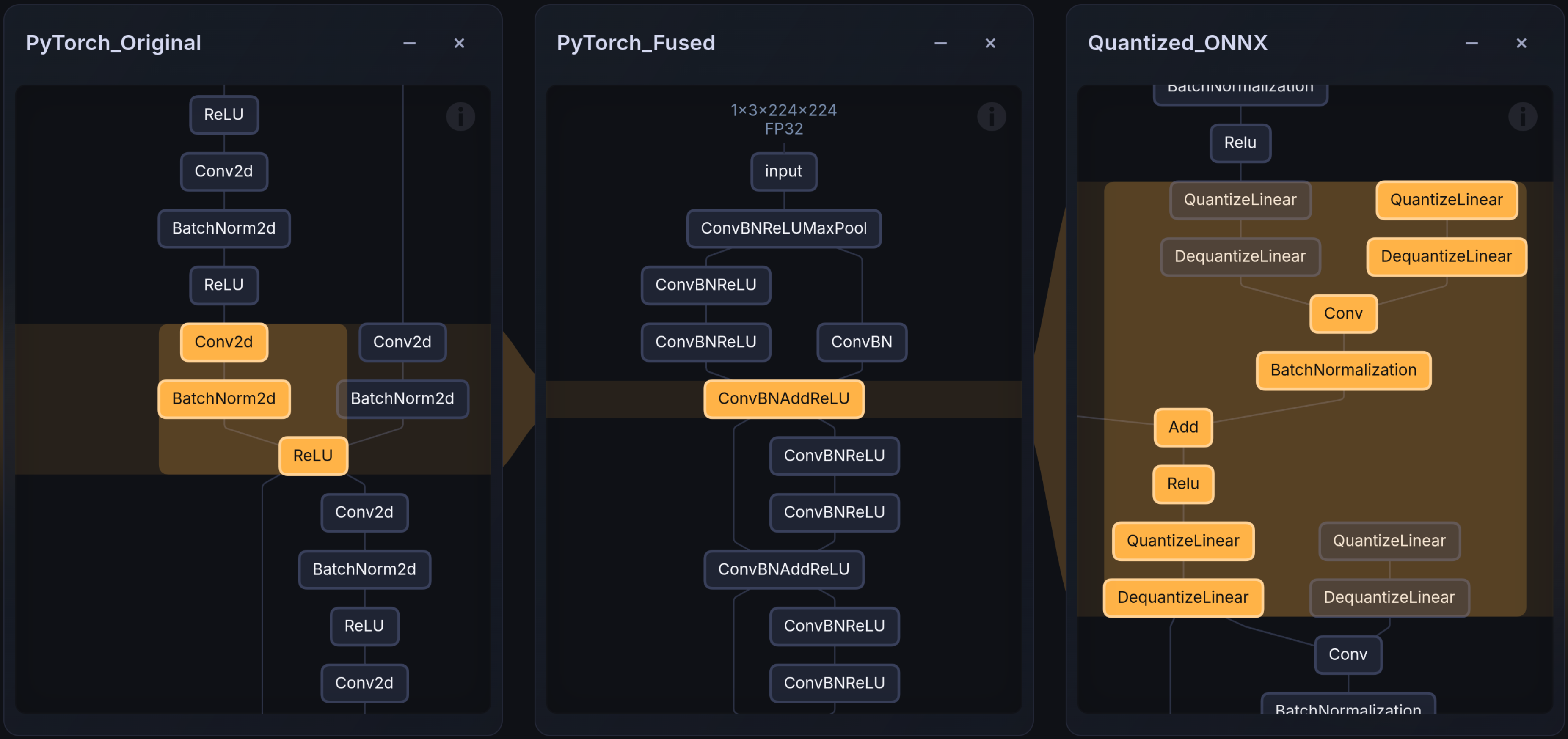
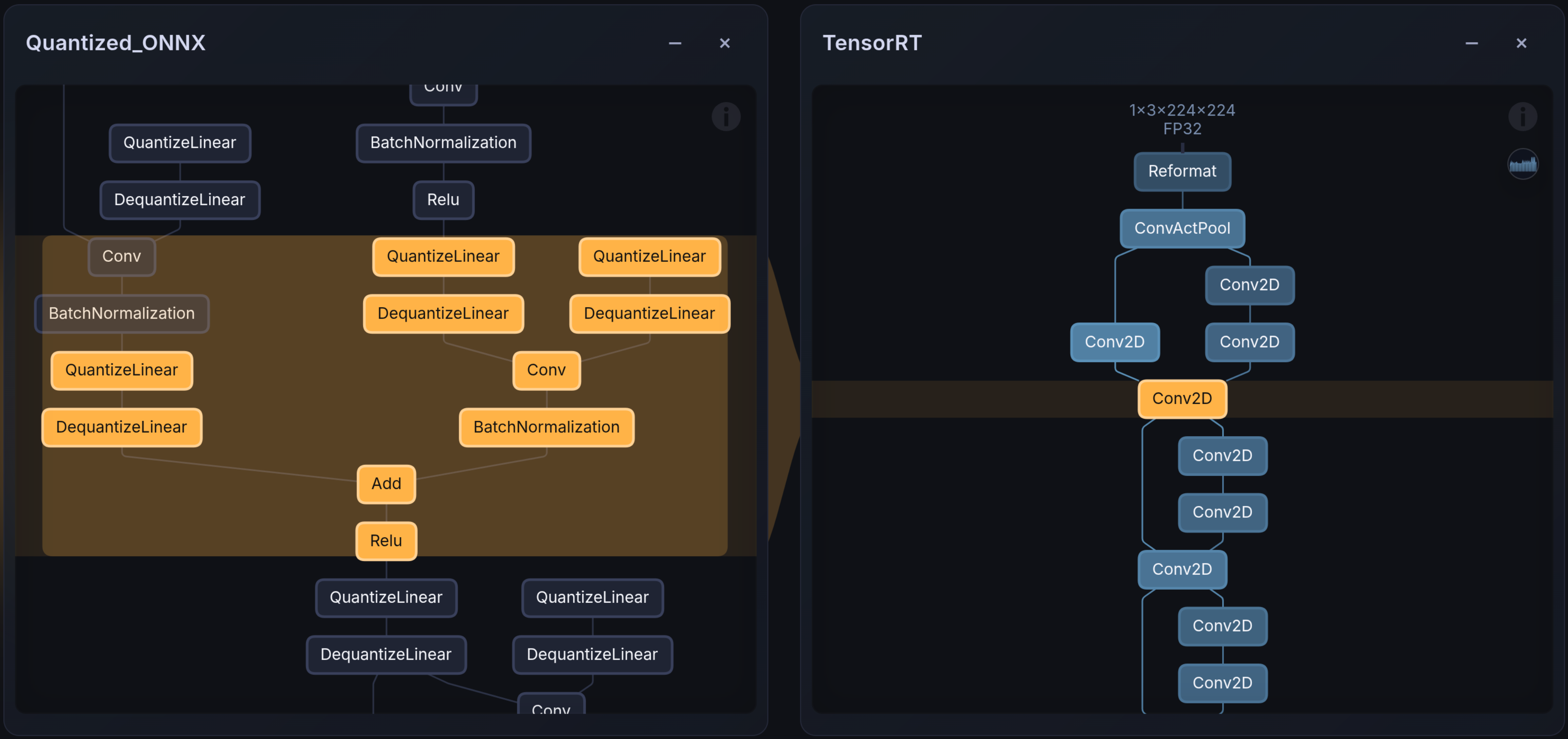
The images below show the layer mapping before and after TensorRT compilation. Embedl Visualizer renders PyTorch graphs, ONNX models, and hardware-compiled artifacts (e.g., TensorRT engines) side-by-side for comparison and debugging. It is available online for public use on Embedl Hub and locally for enterprise solutions.
Next steps#
After these graph rewrites, the model is ready for:
ONNX export —
torch.onnx.export(quantized, example_input, "resnet50.onnx")Quantization — shown above; see the quantization guide for the full PTQ and QAT workflows
TensorRT compilation — compile the ONNX model to a TensorRT engine
/usr/src/tensorrt/bin/trtexec --onnx=resnet50_fused.onnx \
    --exportLayerInfo=layer_info.json \
    --profilingVerbosity=detailed \
    --exportProfile=profile.json